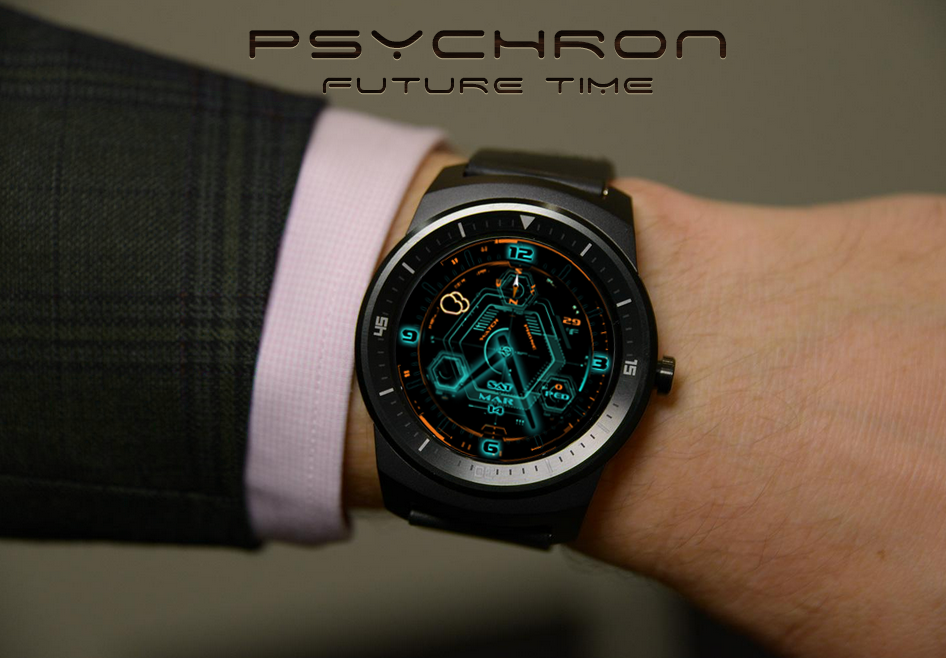
About PsychronPro watch face
Psychron is the most wonderful scifi style watchface with the look of Future. NOTE: Please make sure your watch is running Android Wear 5.0. Features on one face: ✔ 3D Parallax effect (To be enabled in settings)
Psychron is the most wonderful scifi style watchface with the look of Future.
NOTE: Please make sure your watch is running Android Wear 5.0.
Features on one face:
✔ 3D Parallax effect (To be enabled in settings)
✔ Launch screen animation
✔ Compass
✔ Weather icon
✔ Temperature (Fahrenheit and Celsius)
✔ Rotating circle animation
✔ Rotating seconds
✔ Watch/phone battery level
✔ Step count triggered per hour
✔ Month, Date and Day
✔ Hexagon background
✔ Color picker for outer circle contour
✔ Color picker for weather icon
✔ Display in dimmed mode
Support all models:
✔ LG G Watch R
✔ Motorola Moto 360
✔ Samsung Gear Live
✔ Asus Zen Watch
✔ LG G watch
✔ Sony SmartWatch 3
Weather support:
http://openweathermap.org/
How to launch:
1. After install run 'Resync app' on Android Wear App.
2. Long press the watch screen and select Psychron from the watch face picker
3. You might need to wait a second before the app is synced for both phone and watch.
It's the first one of our scifi series. Stay tuned for our next watch face.
Previous Versions
Here you can find the changelog of PsychronPro watch face since it was posted on our website on 2016-10-02 23:45:08.
The latest version is 1.1.7 and it was updated on 2024-04-19 22:43:43. See below the changes in each version.
PsychronPro watch face version 1.1.7
Updated At: 2015-04-25
Changes: v1.1.7,Added color picker for hands.,v1.1.6,Removed in-app purchase permission.
Disclaimer
Official Google Play Link
We do not host PsychronPro watch face on our servers. We did not scan it for viruses, adware, spyware or other type of malware. This app is hosted by Google and passed their terms and conditions to be listed there. We recommend caution when installing it.
The Google Play link for PsychronPro watch face is provided to you by apps112.com without any warranties, representations or guarantees of any kind, so access it at your own risk.
If you have questions regarding this particular app contact the publisher directly. For questions about the functionalities of apps112.com contact us.